
Your First Five Minutes
Everything you need to launch the studio, lay down a beat, and compose your first multi-track arrangement in seconds.
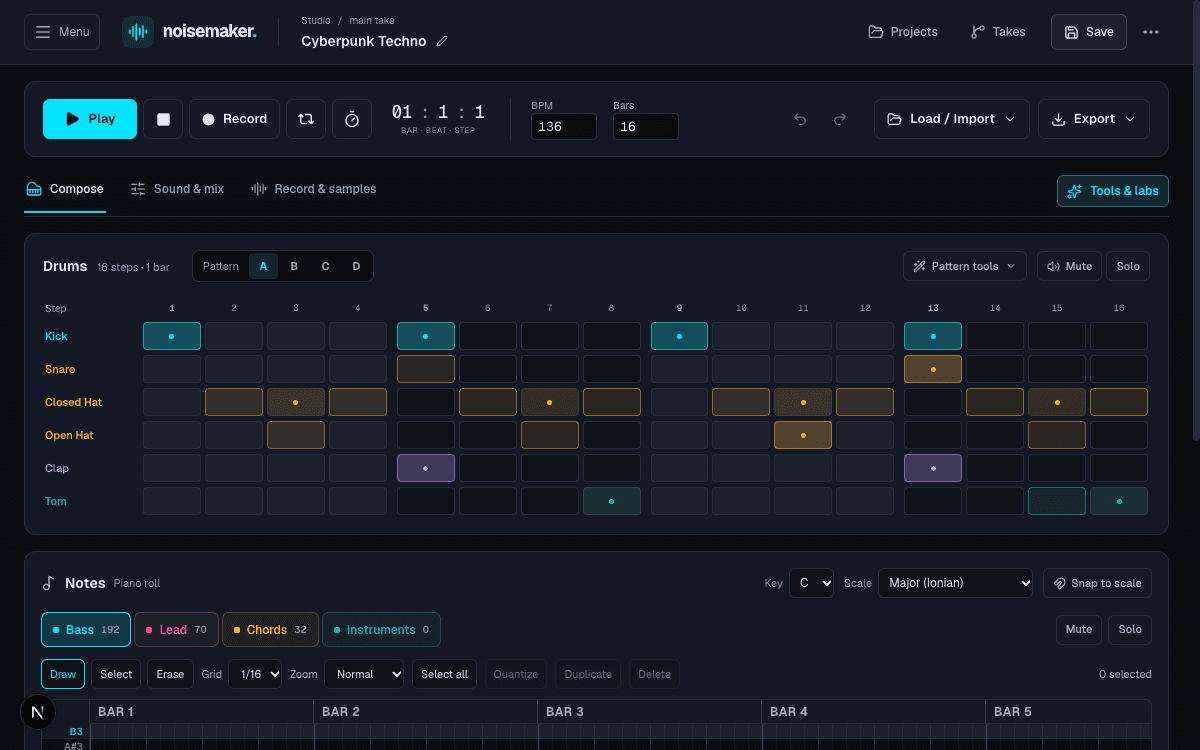
Use Load / Import in the transport to pick a genre template (Synthwave, Lo-Fi, Orchestral, Techno) or import any Standard MIDI file (.mid).
Press Space to Play/Pause. Dial in BPM (40–240), bars (1–256), loop cycle (L), and turn on the metronome.
Toggle between Compose (notes & drums), Sound & mix (synths & automation), and Record & samples (audio lanes).
Click Record to play notes live via computer keys (A–K) or USB/Bluetooth MIDI with velocity and pedal capture.
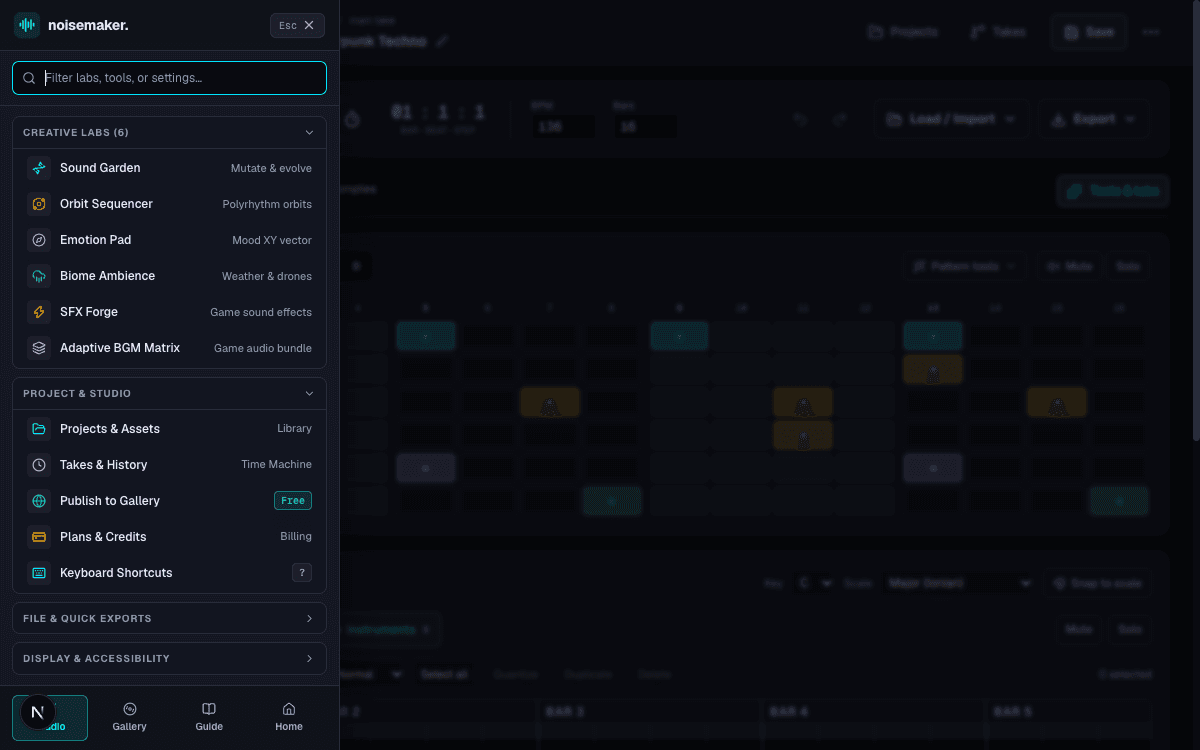
Alt+M (or Cmd/Ctrl+B) anytime to open the slide-out Menu Drawer, giving you instant access to Creative Labs, Project Library, Time Machine, and Display preferences.Keyboard Shortcuts Reference
Speed up your production workflow with complete hotkey controls. Press ? anywhere in the studio to bring up this overlay.
| Shortcut | Action | Description |
|---|---|---|
Space | Play / Pause | Start or pause playback at the current playhead position |
L | Toggle Loop | Enable or disable cyclic loop playback across arrangement bars |
Alt + M / Cmd + B | Open Menu Drawer | Slide open the studio tools, creative labs, and preferences drawer |
? (Shift + /) | Shortcuts Cheat Sheet | Open the keyboard shortcuts reference dialog |
Ctrl/Cmd + S | Save Project | Persist composition to disk and synchronize with MCP agent workspace |
Ctrl/Cmd + Z | Undo | Revert the most recent note, pattern, knob, or clip change |
Ctrl/Cmd + Shift + Z | Redo | Re-apply the previously undone action |
Ctrl/Cmd + A | Select All Notes | Select every note on the active melodic piano roll track |
Ctrl/Cmd + D | Duplicate Selection | Append an exact copy of selected notes at the offset |
Delete / Backspace | Delete Selection | Remove selected notes without affecting unselected notes |
← / → | Nudge Notes | Move selected notes by one sixteenth step (hold Shift for 1 full bar) |
↑ / ↓ | Transpose Notes | Shift selected notes by 1 semitone (hold Shift for 1 octave = 12 semitones) |
1 | Select Drum Machine | Switch focus to 16-step drum machine sequencer |
2 | Select Bass Synth | Switch piano roll to monophonic bassline synthesizer |
3 | Select Lead Synth | Switch piano roll to lead synth (supports NES chiptune pulses) |
4 | Select Pad Synth | Switch piano roll to polyphonic chord pad synthesizer |
5 | Select Sampler | Switch piano roll to 184 acoustic, orchestral, and private sample presets |
A, S, D, F, G, H, J, K | Musical Typing: White Keys | Play C, D, E, F, G, A, B, and high C in the current octave |
W, E, T, Y, U | Musical Typing: Black Keys | Play sharps/flats: C#, D#, F#, G#, A# |
Z / X | Octave Shift Down / Up | Shift musical typing keyboard down or up by one full octave |
The Three Workspaces
Noisecraft organizes your musical workflow into three specialized tabs: Compose, Sound & Mix, and Record & Samples.
1. Compose (Drums & Piano Roll)
The Compose workspace provides everything needed to arrange beats and melodies:
- 16-Step Drum Machine: Sequence Kick, Snare, Closed Hat, Open Hat, Clap, and Tom across 16 steps. Switch between four independent pattern banks (
A,B,C,D) to program song sections. Add groove swing (50% to 75%) or click Quick fill for Euclidean rhythms. - Multi-Track Piano Roll: Four melodic tracks:
bass(monophonic punch),lead(soaring melodies),pad(chords), andsampler(orchestral and private recordings). - Inspector & Editing: Shift-click multi-select, drag notes to move/resize, Quantize to grid divisions, or Duplicate by bar offsets.
Synthesis & Track Volume Automation
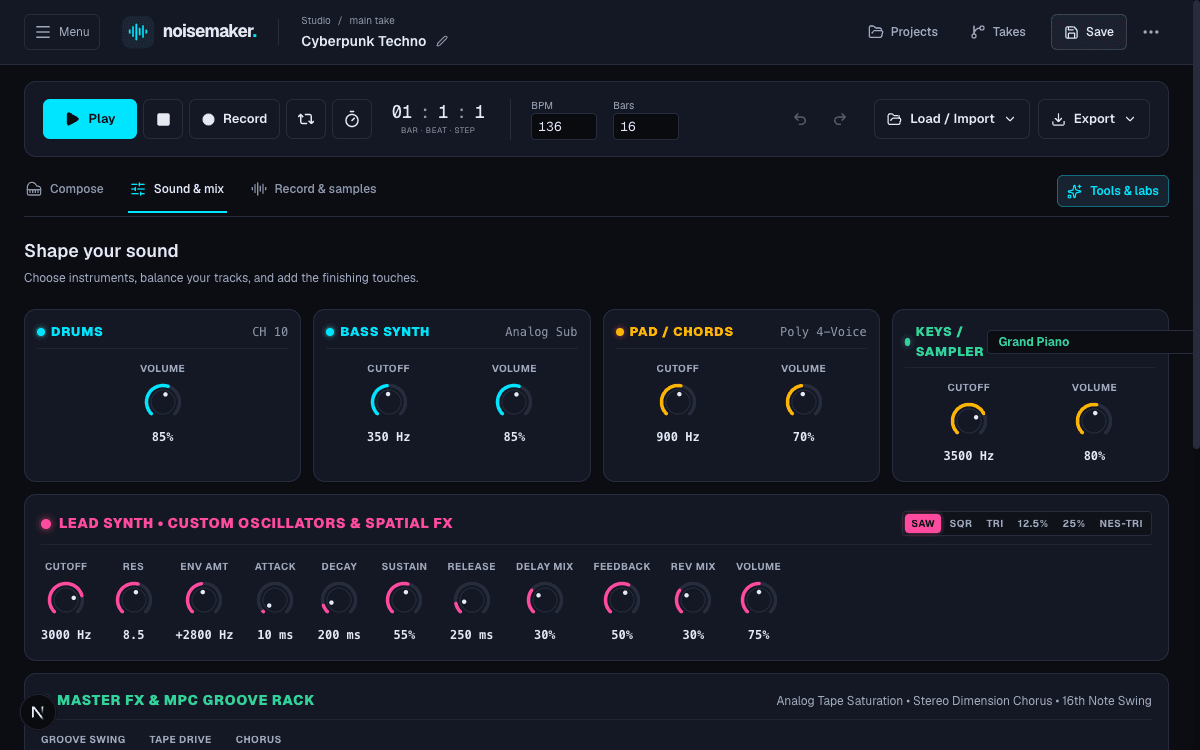
Sculpt analog-style tones, authentic retro NES pulses, and automate dynamic volume swells across your composition.
Track Volume Automation Editor
In the Sound & mix view, the Automation Editor allows you to draw continuous volume curves across the song for drums, bass, lead, pad, and sampler:
- Absolute Gain Range: Values range from
0.0(completely silent) to1.5(+3.5 dB boost). - Interpolation Modes: Choose Linear for smooth gradual ramps and fade-ins, or Step for instant drops and stutter effects.
- Persistent Curves: Automation curves survive saves, idea branch merges, and audio exports.
Master Effects Rack
- Stereo Chorus: Multi-voice delay modulation for stereo widening and lush thickness.
- Master Delay: Synchronized echo with adjustable time, feedback, and dry/wet balance.
- Convolution Reverb: Warm acoustic space with room size and damping controls.
- Master Drive: Harmonic analog saturation that glues your mix together.
Private Audio Lanes & Sample Library
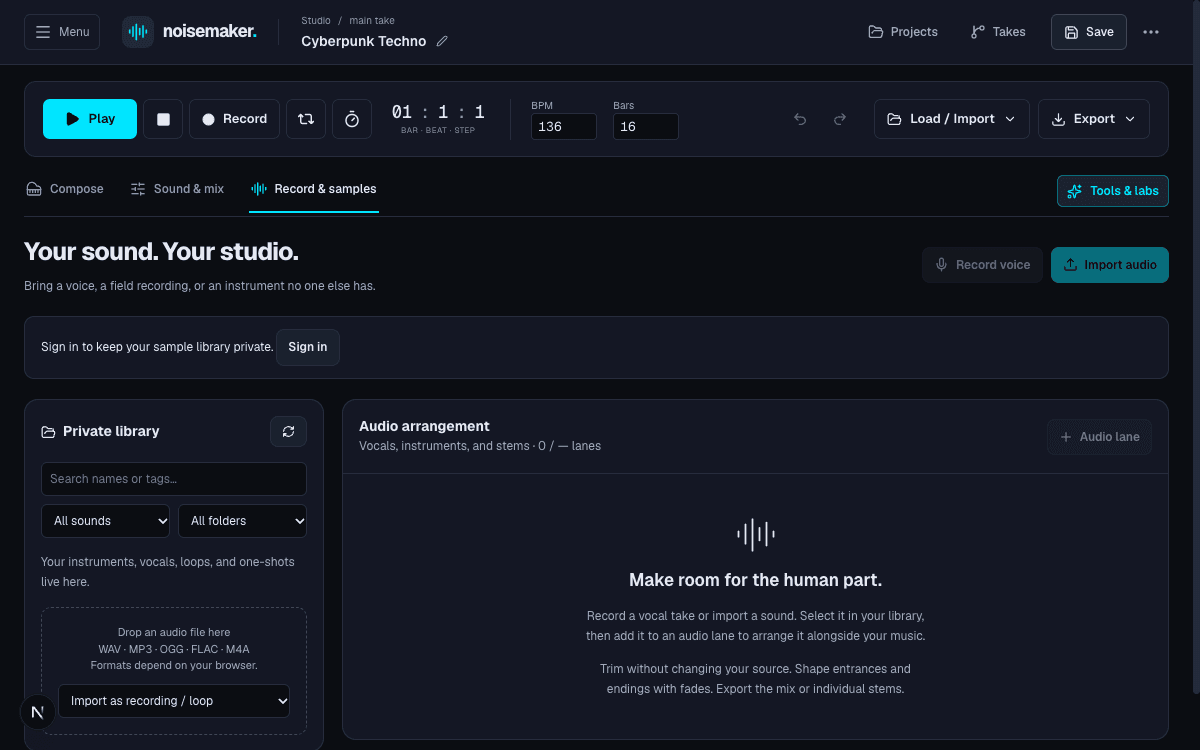
Bring real vocals, acoustic recordings, and stems into the arrangement with non-destructive clip editing and private storage.
Clip Editing Tools
- Split: Slice a clip at any sixteenth-note step or playhead position without altering source audio.
- Duplicate: Copy clips across positions or lanes while retaining source trims and gain.
- Move: Drag clips along the timeline or transfer between lanes.
- Trims & Fades: Set start offsets, durations, and smooth fade-in/fade-out curves in seconds.
- Play as Instrument: Select any imported sample as a tuned sampler instrument, transposed from its root MIDI note (default 60 = C4).
184 Built-In Instruments
Explore 52 recorded acoustic & orchestral instruments, all 128 General MIDI programs, and 4 synthetic keys presets. Click any Preset ID to copy:
| Category | Instrument | Preset ID (Click to Copy) | GM # | Pitch Range | Musical Role |
|---|---|---|---|---|---|
| Woodwinds | Concert Piccolo | 72 | D5–C8 (74–108) | Bright, piercing high woodwind melody; orchestral sparkle | |
| Woodwinds | Concert Flute | 73 | C4–C7 (60–96) | Lyrical vibrato lead, breathy pastoral runs, expressive high themes | |
| Woodwinds | Alto Flute | 73 | G3–G6 (55–91) | Deep, smoky, breathy low woodwind with warm dark luster | |
| Woodwinds | Clarinet | 71 | D3–F6 (50–89) | Warm woodwind sustain, jazz chords, mid-register counterpoint | |
| Woodwinds | Bass Clarinet | 71 | D2–G5 (38–79) | Deep woody low counterpoint and agile subterranean basslines | |
| Woodwinds | Oboe | 68 | A#3–F6 (58–89) | Poignant double-reed solo lead with cutting emotional vibrato | |
| Woodwinds | English Horn (Cor Anglais) | 69 | E3–C6 (52–84) | Melancholic double-reed mid-register voice with rich pastoral timbre | |
| Woodwinds | Bassoon | 70 | A#1–D#5 (34–75) | Rich low woodwind foundation, staccato bass motifs, warm legato | |
| Woodwinds | Contrabassoon | 70 | A#0–C4 (22–60) | Subterranean double-reed low orchestral rumble | |
| Brass | French Horn | 60 | A0–A4 (33–69) | Noble heroic brass, cinematic horn calls, warm harmonic chords | |
| Brass | Muted French Horn | 60 | A#1–F4 (46–77) | Stopped con sordino mute; distant, menacing, mysterious calls | |
| Brass | Trumpet | 56 | F3–C6 (53–84) | Brilliant fanfares, crisp energetic leads, dramatic stabs | |
| Brass | Straight Mute Trumpet | 59 | F3–C6 (53–84) | Piercing, metallic, biting classical and jazz trumpet mute | |
| Brass | Harmon Muted Trumpet | 59 | F3–C6 (53–84) | Intimate jazz noir, espionage themes, dry harmon mute sizzle | |
| Brass | Tenor Trombone | 57 | A#1–F4 (34–65) | Bold low-mid brass harmonies, majestic fanfares, stately chords | |
| Brass | Bass Trombone | 57 | F1–B4 (29–71) | Deep, resonant brass authority with monumental low-end bite | |
| Brass | Orchestral Tuba | 58 | F1–D4 (29–62) | Subterranean brass foundation, weighty accents and orchestral hits | |
| Strings | Bowed Violins Section | 48 | G3–D7 (55–98) | Lush ensemble violin section, soaring melodic lines, cinematic pads | |
| Strings | Solo Concert Violin | 40 | G3–C7 (55–96) | Singing acoustic vibrato, virtuosic concertos, emotional solo leads | |
| Strings | Tremolo Violins | 44 | G3–D6 (55–86) | Rapid bowed tremolo, cinematic suspense, gothic tension builds | |
| Strings | Spiccato Strings | 48 | G3–D6 (55–86) | Crisp bouncing bow stabs, driving trailer ostinatos and runs | |
| Strings | Bowed Violas | 41 | C3–A6 (48–93) | Warm, husky string counterpoint bridging violins and cellos | |
| Strings | Bowed Cellos | 42 | C2–F5 (36–77) | Expressive ensemble cello chords, rich emotional countermelodies | |
| Strings | Contrabass (Double Bass) | 43 | F#1–B3 (30–59) | Heavy bowed double bass acoustic foundation | |
| Strings | Solo Violin Pizzicato | 45 | G3–D6 (55–86) | Crisp, intimate solo concert violin string plucks | |
| Strings | Violin Section Pizzicato | 45 | G3–D6 (55–86) | Real recorded ensemble violin plucks with natural room decay | |
| Strings | Viola Section Pizzicato | 45 | C3–A5 (48–81) | Rich, mellow ensemble viola plucks for mid-range rhythm | |
| Strings | Cello Section Pizzicato | 45 | C2–F5 (36–77) | Warm acoustic cello plucks, resonant mid-bass string pulses | |
| Strings | Contrabass Pizzicato | 43 | E1–G3 (28–55) | Acoustic upright double bass walking plucks | |
| Percussion | Concert Harp | 46 | E1–F7 (28–101) | Lush plucked strings, gentle fantasy chords, cascading glissandi | |
| Percussion | Glockenspiel | 9 | G4–C7 (67–96) | Shimmering metallic bells, bright chime motifs, music-box sparkle | |
| Percussion | Orchestral Marimba | 12 | F2–C7 (41–96) | Warm wooden tuned percussion, rhythmic acoustic pulses, game BGM | |
| Percussion | Orchestral Xylophone | 13 | F4–C8 (65–108) | Bright, sharp wooden mallet percussion for energetic runs | |
| Percussion | Tubular Bells (Chimes) | 14 | C4–F5 (60–77) | Grand orchestral clock chimes, majestic ceremonial hits | |
| Percussion | Orchestral Timpani | 47 | F#2–F#3 (42–54) | Thunderous struck kettle drums, dramatic accents and crescendos | |
| Percussion | Timpani Crescendo Roll | 47 | F#2–F#3 (42–54) | Continuous kettle drum rolls for climactic tension builds | |
| Percussion | Concert Crash Cymbal | 49 | C4 (60) | Symphonic crash cymbal with long shimmering decay | |
| Percussion | Tam-Tam / Gong | 119 | C4 (60) | Massive bronze tam-tam gong with deep roaring 4.5s decay | |
| Percussion | Concert Triangle | 81 | A5 (81) | Crystalline high metallic ring for delicate rhythmic sparkle | |
| Percussion | Concert Claves | 75 | D#5 (75) | Crisp resonant rosewood stick strike with cutting high-mid transient | |
| Percussion | Percussion Cowbell | 56 | G#3 (56) | Dry metallic cowbell tap for rhythmic latin and rock grooves | |
| Percussion | Orchestral / Latin Conga | 63 | D#3 (63) | Warm hand percussion conga drum with woody low-mid resonance | |
| Percussion | Concert Bell Tree | 99 | G6 (91) | Cascading metallic chimes glissando for fantasy transitions | |
| Percussion | Sleigh Bells (Jingles) | 83 | B5 (83) | Hand-shaken orchestral jingle bells for festive sparkle | |
| Percussion | Orchestral Anvil | 98 | G4 (67) | Heavy iron anvil strike for industrial or operatic accents | |
| Percussion | Brake Drum | 98 | F#4 (66) | High-impact automotive metal strike for aggressive accents | |
| Percussion | Concert Snare | 38 | D2 (38) | Symphonic snare with crisp responsive buzz and room ambiance | |
| Percussion | Gran Cassa Bass Drum | 35 | C2 (36) | Grand orchestral bass drum with thunderous low-end impact | |
| Percussion | Concert Tambourine | 54 | F#3 (54) | Real orchestral tambourine strike with crisp jingles | |
| Voices | Mixed Symphonic Choir | 52 | C3–A5 (48–81) | Expressive mixed male/female choral bed, epic vocal sustains | |
| Keys | Acoustic Upright Piano | 0 | A0–C8 (21–108) | Authentic felt and hammer recordings, natural dynamic response | |
| Keys | Cathedral Pipe Organ | 19 | C2–C7 (36–96) | Majestic cathedral pipe organ, magnificent gothic harmonic weight |
Generative Algorithms & Labs
Break through creative blocks with algorithms that respect musical theory while introducing exciting generative variations.
Evolve four parallel mutant strains (alpha, beta, gamma, delta) across Harmonic Drift, Fractured Rhythm, Ethereal Echo, or Acid Mutation. Cross-breed traits and adopt your favorite take.
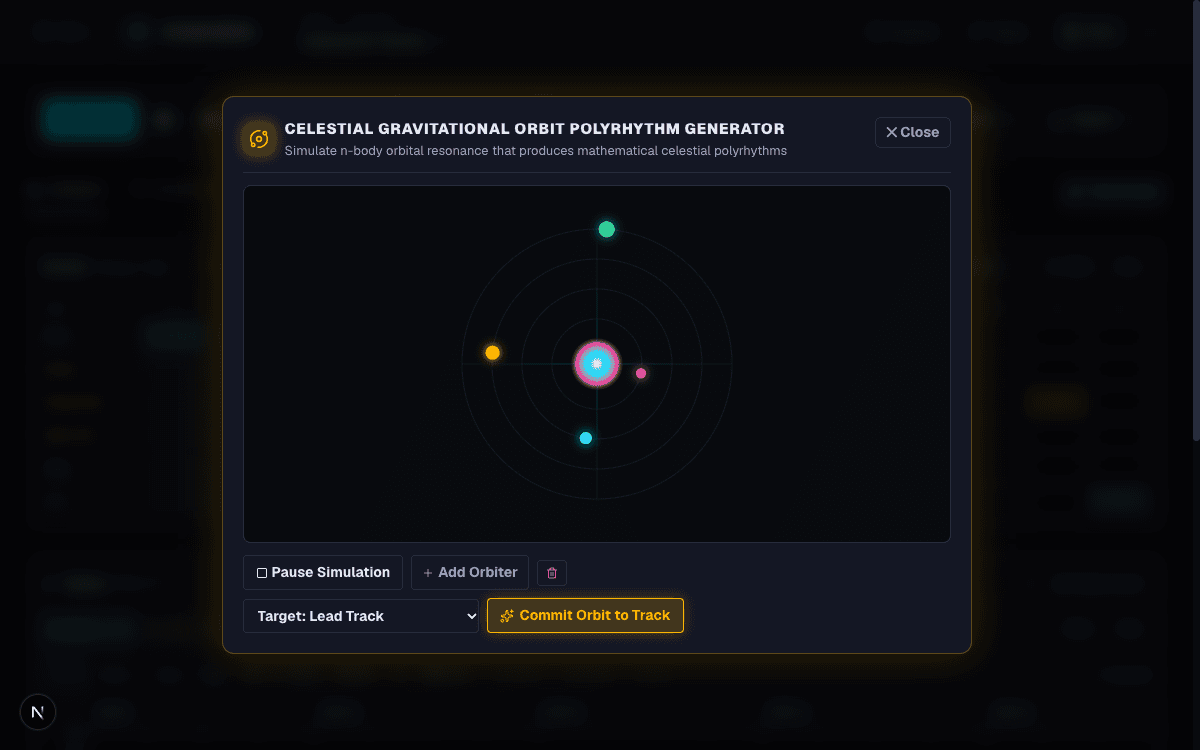
Simulate planetary gravitational orbits. Collisions trigger tuned scale notes. Adjust orbital speeds and radii, then inject patterns into any track.
Move across a 2D mood vector (calm to kinetic, melancholy to euphoric). A single gesture morphs filter cutoffs, resonance, reverb, drive, and chorus.
Set occurrence probabilities (5% to 100%) and alternative pitches on any note. The sequence probabilistically evolves every time the loop repeats.
Game Audio, SFX Forge & Biomes
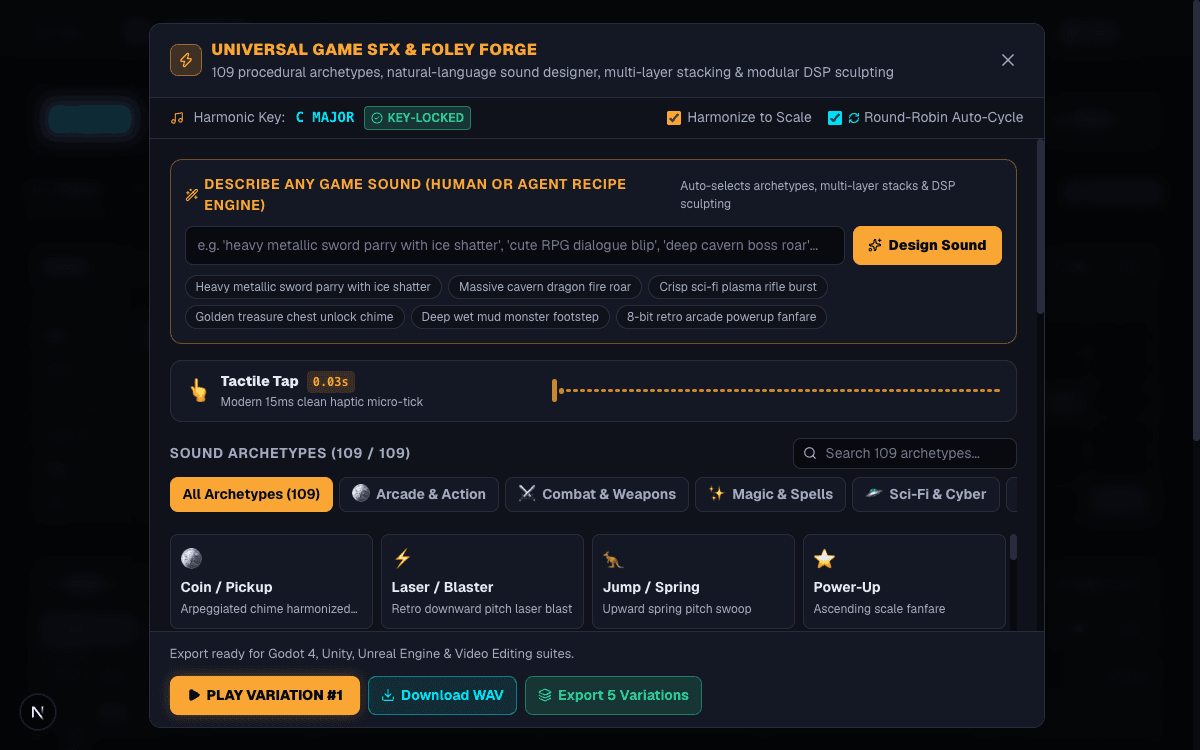
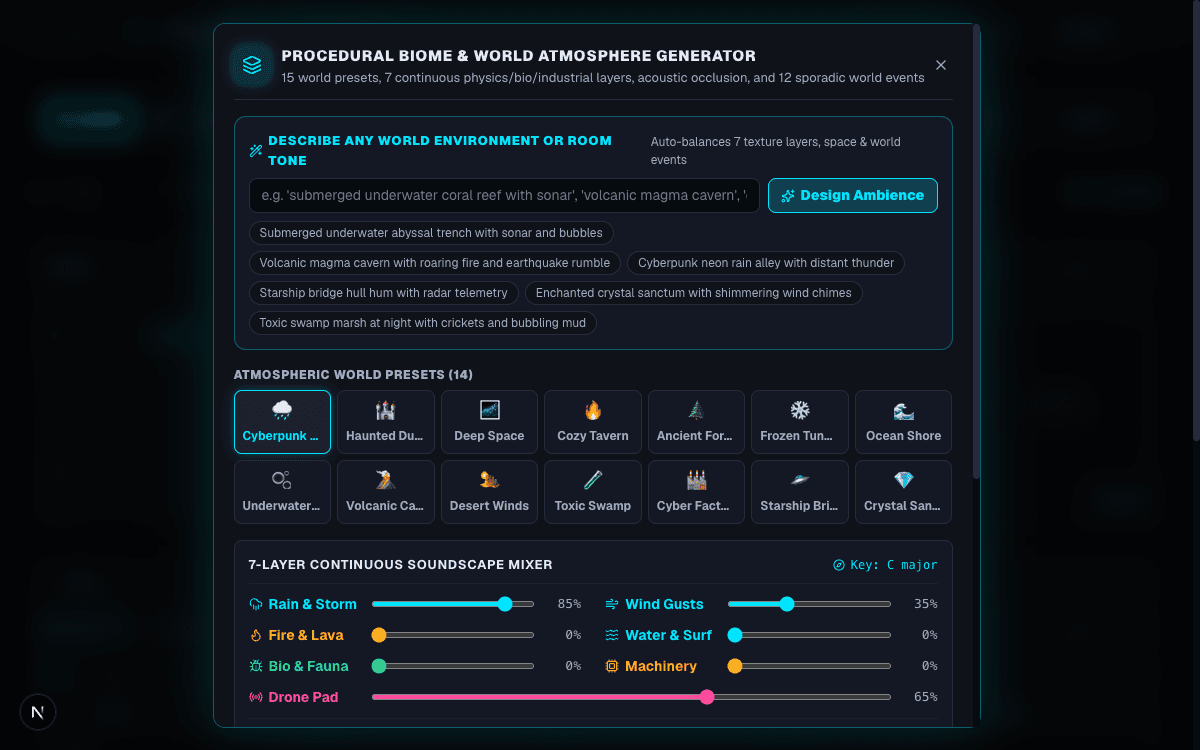
Deliver an integrated game audio universe: adaptive soundtracks, procedural ambient biomes, and scale-locked sound effects.
Adaptive BGM Matrix & Game Bundle Export
Audition multi-tier dynamic music intensity: Exploration (ambient), Tension (rising suspense), and Combat (driving rhythm). Click Export Game Audio Bundle to receive:
- Seamless loop-point-embedded WAV master mixes for each intensity tier.
- Individual track stems (drums, bass, lead, pad, sampler, audio lanes).
- Separate standalone loop of active procedural biome ambience.
- Folder of key-locked sound effects synthesized with SFX Forge.
- Standard multi-track MIDI file (
.mid) and project backup JSON. - Complete integration manifest and plug-and-play starter scripts for Godot 4.3+ (GDScript) and Unity (C# AudioSource intensity controller).
Live Agent Sync & MCP Server
Connect Claude Desktop, Cursor, Windsurf, or Google Antigravity to compose, arrange, automate, and export music collaboratively.
1. Client Configuration (mcpServers)
Add Noisecraft to your MCP client configuration (e.g. claude_desktop_config.json or Cursor MCP settings):
{
  "mcpServers": {
    "noisecraft": {
      "command": "npm",
      "args": [
        "--prefix",
        "/absolute/path/to/noisecraft",
        "run",
        "--silent",
        "mcp"
      ],
      "env": {
        "NOISECRAFT_API_KEY": "nm_agt_your_signed_in_agent_token"
      }
    }
  }
}{
"mcpServers": {
"noisecraft": {
"command": "npx",
"args": [
"tsx",
"/absolute/path/to/noisecraft/src/mcp/server.ts"
],
"env": {
"NOISECRAFT_API_KEY": "nm_agt_your_signed_in_agent_token"
}
}
}
}2. Turn on Live Agent Sync
- Open the studio at
http://localhost:3000/studioon the same machine. - Click the More options (⋯) button in the studio header.
- Toggle Live agent sync to On.
- Ask your agent to write a chord progression, lay down drum grooves, or sculpt a synth patch. Edits appear in the browser studio instantly!
Complete MCP Tool Catalog
Filter and inspect all 65+ Model Context Protocol tools supported by the Noisecraft studio server. Click any tool name to copy:
| Domain | Tool Name (Click to Copy) | Key Parameters | Capability / Description |
|---|---|---|---|
| Projects | None | Read active project: BPM, total bars, notes, knobs, scale, and folders | |
| Projects | None | List all library projects with ID, BPM, bars, note count, and active status | |
| Projects | name, bpm, totalBars, templateId | Create a new project with optional genre template | |
| Projects | projectId | Switch the active studio project by ID or exact name | |
| Projects | projectId?, name?, description? | Save active project to disk or update metadata | |
| Projects | projectId, newName?, makeActive? | Duplicate an entire project including folders, items, and audio | |
| Projects | projectId | Delete a project from the studio library by ID | |
| Projects | projectId? | Retrieve complete manifest including items, folders, and tracks | |
| Assets | name, parentId? | Create nested folders to organize presets and assets | |
| Assets | folderId, newName | Rename an existing folder within a project | |
| Assets | folderId, targetParentId | Move a folder to a new parent or to root level | |
| Assets | folderId, newName? | Duplicate a folder and all its contents inside a project | |
| Assets | folderId, deleteContents | Delete folder with option to delete or move items to root | |
| Assets | projectId? | List all folders in project with hierarchy and item counts | |
| Assets | name, type, data, folderId? | Store sound, effect, sfx, biome, pattern, or song items | |
| Assets | itemId, projectId? | Retrieve asset details and data payload | |
| Assets | itemId, name?, data?, tags? | Update item payload, tags, name, or folder | |
| Assets | itemId, targetFolderId | Move an asset item between folders or to root | |
| Assets | itemId, newName?, targetFolderId? | Duplicate an asset item within a project | |
| Assets | itemId, projectId? | Delete an asset item from a project | |
| Assets | folderId?, type?, search? | Filter items in project by type, folder, or search query | |
| Assets | itemId, projectId? | Load a sound, effect, drum pattern, or song into the active studio | |
| Notes | track, startStep?, endStep?, pitch? | Read track notes with indices and updatedAt revision token | |
| Notes | track, notes: [{pitch, start, length, ...}] | Add notes with per-note instrument, velocity, or quantum probabilities | |
| Notes | track, indices, edit, expectedUpdatedAt | Atomic move, transpose, resize, velocity, quantize, duplicate, delete | |
| Notes | track, rootPitch, chordType, start, length | Add major, minor, 7th, maj7, min7, sus4, or dim chords to pad/sampler | |
| Notes | track, startStep?, endStep?, pitch? | Delete notes by step range or specific pitch | |
| Notes | track | Clear all notes on a specific track | |
| Notes | track, semitones, snapToScale? | Transpose track notes up or down with optional scale snapping | |
| Drums | instrument, steps: [16] | Set 16-step pattern for Kick, Snare, Closed Hat, Open Hat, Clap, Tom | |
| Drums | bank: 'A' | 'B' | 'C' | 'D' | Switch active drum pattern bank | |
| Drums | algorithm: 'euclidean' | 'buildup' | Generate organic rhythmic fills automatically | |
| MIDI | filePath, name?, makeActive? | Import a local Standard MIDI file into a new library project | |
| Mixer | None | List all 184 built-in instruments, ranges, GM numbers, and roles | |
| Mixer | preset | Set default instrument sound of the sampler track | |
| Mixer | waveform | Set lead synth wave: Sawtooth, Square, Triangle, NES pulses | |
| Mixer | knobs: {cutoff, resonance, volume...} | Adjust synth filter cutoffs, resonance, envelopes, and master FX | |
| Mixer | bpm (40-240) | Set project tempo in BPM | |
| Mixer | totalBars (1-256) | Set arrangement duration in bars | |
| Mixer | root, mode | Configure musical scale and key snapping | |
| Mixer | None | List all 11 supported musical scales and intervals | |
| Mixer | swing (50-75) | Set drum machine groove swing percentage | |
| Automation | None | Inspect volume automation curves across all 5 tracks | |
| Automation | track, interpolation, points, expectedUpdatedAt | Set linear ramp or step volume automation curve (0–1.5 gain) | |
| Automation | track, expectedUpdatedAt | Remove volume curve and restore control to base fader | |
| Audio | search?, kind?, folder? | Search private PCM WAV recordings, storage usage, and lane limits | |
| Audio | filePath, metadata | Import a local WAV into private account library | |
| Audio | sampleId, changes | Rename, tag, organize, or adjust root note and sample gain | |
| Audio | sampleId, confirmDelete | Permanently delete a private recording | |
| Audio | sampleId? | Set imported instrument as default sound for sampler track | |
| Audio | None | Inspect vocal/recorded audio lanes and clips with sixteenth timing | |
| Audio | name, sampleId?, startStep? | Add an independent vocal, loop, or field-recording lane | |
| Audio | trackId, changes | Adjust lane gain (0–2), pan (-1 to 1), mute, and solo | |
| Audio | trackId | Remove an audio lane from the current composition | |
| Audio | trackId, clip | Place a recording on a lane with start step, trim offset, and fades | |
| Audio | trackId, clipId, changes | Move, trim, fade, or adjust gain of a clip | |
| Audio | trackId, clipId | Remove a clip from the arrangement without deleting source | |
| Audio | trackId, clipId, splitStep | Non-destructively slice a clip into two independent pieces | |
| Audio | trackId, clipId, startStep, targetTrackId? | Copy a clip to another position or lane | |
| Audio | trackId, clipId, targetTrackId, startStep? | Transfer or nudge audio clips across tracks or positions | |
| Generative | None | List all genre starter templates | |
| Generative | templateId | Load a complete genre template into the arrangement | |
| Generative | lens, mutationRate | Generate 4 mutant offspring via Darwinian Sound Garden | |
| Generative | rhythmMutant, harmonyMutant | Cross-breed rhythmic traits of one mutant with harmonic traits of another | |
| Generative | orbits, track | Inject planetary physics polyrhythms into piano roll | |
| Generative | valence, arousal | Set 2D Emotion Pad mood vector | |
| Game SFX | None | List all 109 sound effect archetypes and 9 categories | |
| Game SFX | None | Inspect current SFX parameters | |
| Game SFX | params | Configure SFX parameters: frequency, sweep, noise, filter, decay | |
| Game SFX | prompt, category | Synthesize game sound effects from natural language or archetypes | |
| Biomes | None | Inspect procedural biome ambience settings | |
| Biomes | preset, layers, sporadicEvents | Configure procedural environmental weather and drone soundscapes | |
| Takes | message, isMilestone?, milestoneTag? | Freeze current arrangement as an immutable checkpoint | |
| Takes | projectId? | List all checkpoints, milestones, and idea branches | |
| Takes | name, description? | Create an alternate creative branch take without risking main song | |
| Takes | branchName?, commitId? | Switch studio playback to an alternate idea branch or past checkpoint | |
| Takes | sourceBranch, tracks | Selectively merge tracks from an idea take into current branch | |
| Takes | versionA, versionB | Plain-English musical diff comparison of notes, tempo, and instruments | |
| Takes | commitId, createNewBranch? | Restore any past checkpoint safely | |
| Takes | commitId, isMilestone, label? | Star a checkpoint with a milestone release tag | |
| Community | title, description, genre, allowRemix | Publish active project to community gallery with 50-bar waveform peaks | |
| Community | genre?, search?, sort? | Search and filter published community tracks | |
| Community | trackId | Inspect detailed metadata, waveform peaks, and stats of published track | |
| Community | publishedTrackId | Open a published song into studio as a new editable project with attribution | |
| Community | trackId | Toggle like on any published track | |
| Community | None | Inspect your infinite playlists and track counts | |
| Community | name, description? | Create a new infinite playlist | |
| Community | action, playlistId, trackId? | Add or remove tracks from playlist, or delete playlist | |
| Exports | operation, durationSeconds? | Quote server export credits before rendering | |
| Exports | outputPath?, seamlessLoop? | Render 16-bit 44.1kHz stereo WAV audio mixdown | |
| Exports | outputDirectory?, seamlessLoop? | Render separate WAV audio files for every track plus MIDI | |
| Exports | outputPath? | Export multi-track MIDI file (.mid) | |
| Exports | durationSeconds, outputPath? | Export standalone loop of active procedural ambience | |
| Exports | prompt, outputPath? | Synthesize and export standalone sound effect WAV | |
| Exports | outputDirectory?, seamlessLoop? | Render multi-tier intensity loops, stems, SFX, ambience, and engine scripts | |
| Exports | None | Inspect active subscription plan, render credit balance, and storage |
Takes & Time Machine Versioning
Never lose a creative breakthrough. Noisecraft includes complete Git-style version control designed specifically for music producers.
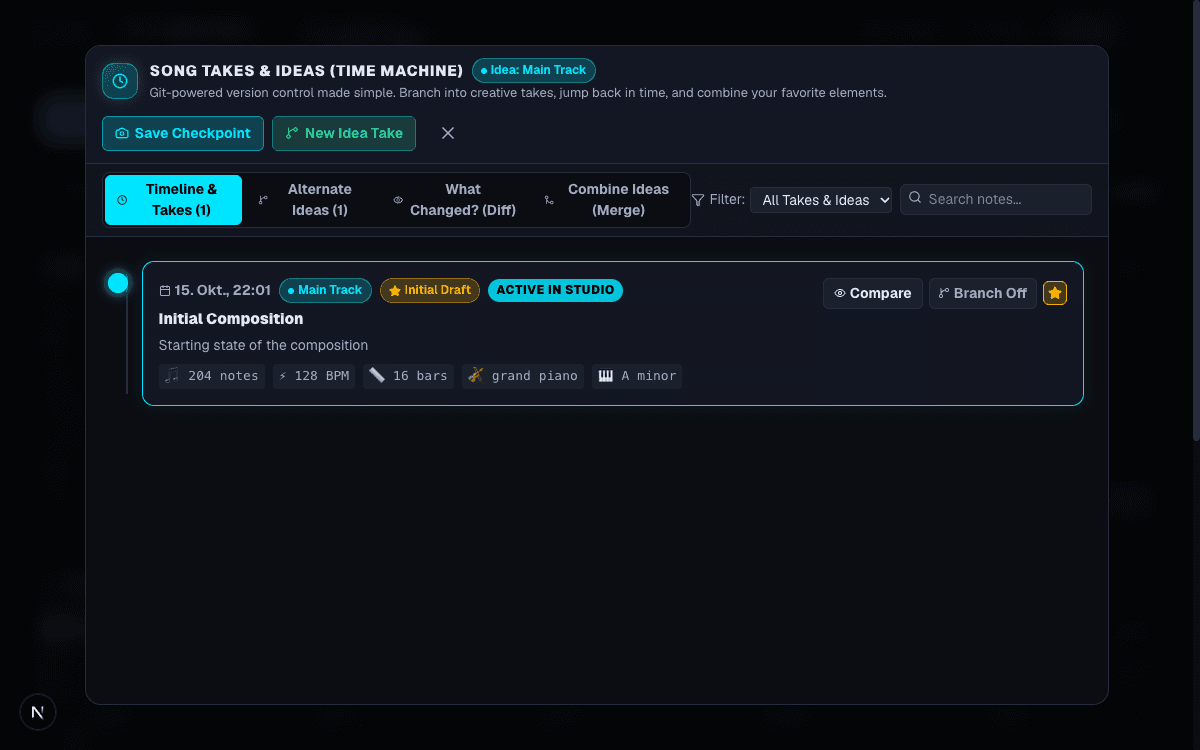
- Checkpoints: Frozen snapshots of the entire song (notes, drums, synth knobs, automation, tempo) saved with a descriptive musical note.
- Milestones (Tags): Star landmark moments (⭐ Demo 1.0, Rough Mix, Radio Edit, Final Master).
- Idea Branches: Spin off alternate creative paths (e.g. Lo-Fi Take, 808 Drums, Acoustic Bridge) without altering your main song.
- Musical Diff: Side-by-side musical breakdown between any two checkpoints (e.g. Tempo: 110 → 125 BPM, Lead: +4 notes).
- Selective Combining (Merge): Pick and choose elements from an idea branch into your target branch with track checkboxes (Lead, Bass, Pad, Sampler, Drums, Automation, Knobs, Song Structure).
Audio Exports & Community Soundstage
Export professional stems and MIDI for external DAWs, or share your music with the community for free.
Export Menu Options
- Audio mixdown (WAV): High-fidelity 16-bit 44.1kHz stereo file. Check Seamless loop tail to blend reverb tails into the start.
- Individual track stems: Separate WAV files for drums, bass, lead, pad, sampler, and audio lanes.
- Standard MIDI (.mid): Polyphonic notes, velocities, and tempo mappings for Ableton, Logic, FL Studio, or Reaper.
- Project backup (JSON): Portable backup file containing your entire arrangement and asset library.
Community Soundstage & Infinite Playlists
Publishing to the Community Gallery is 100% free and requires 0 render credits:
- Normalized Waveform Peaks: 50-bar vectors calculated automatically for interactive visual seekbars.
- 1-Click Studio Remixing: Any creator can click Remix in Studio to load your published notes, presets, and drums.
- Infinite Playlists: Create unlimited public or private playlists with continuous sequential auto-advance.
Simple Pricing & Render Credits
Everything you need to create in the browser is free. Paid plans add private library storage, offline device listening, and server render credits.
| Plan | Monthly Price | Annual Total (16.7% Off) | Credits / Mo | Private Audio Storage | MCP Agent |
|---|---|---|---|---|---|
| Free | €0 | — | 30 | — | — |
| Listener | €4.99 | €€49.90 | 90 | — | Included |
| Creator | €9.99 | €€99.90 | 300 | — | Included |
| Studio | €19.99 | €€199.90 | 750 | 5 GiB (Unlimited lanes) | Included |
| Power | €39.99 | €€399.90 | 2,250 | 15 GiB (Unlimited lanes) | Included |
Render Credit Rates (Server-Rendered Only)
- Zero Credits: All in-browser playback, editing, browser WAV/MIDI exports, and community publishing use 0 credits.
- Server MIDI: 1 credit.
- Server WAV Mixdown: 1 credit per started minute.
- Server Stems & MIDI: 3 credits per started minute.
- Game Audio Bundle: 5 credits per started composition minute (includes loops, stems, SFX, ambience, and scripts).
- SFX Forge: 1 credit per generated sound effect.
- Biome Ambience: 1 credit per started minute.